
Order taking for restaurants · Guadeloupe

Your orders in the kitchen before you even leave the table.

Waiters take the order on their phone. The kitchen and the bar get it instantly, with every extra and every “no onions”. No hardware to buy, no commitment.

30 days freeNo credit cardNo commitment
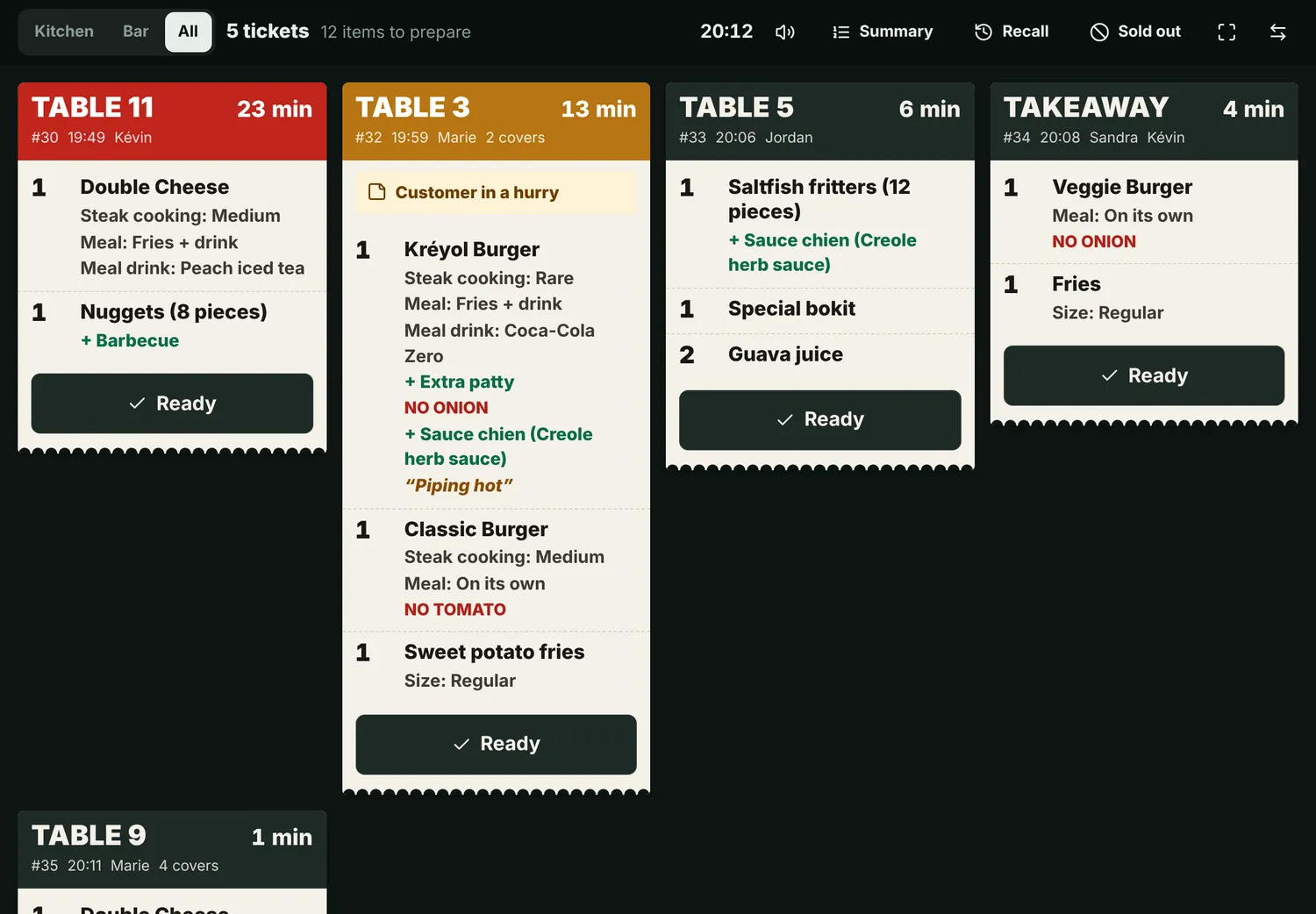
Kitchen screen: table tickets arrive live, with extras and a timer
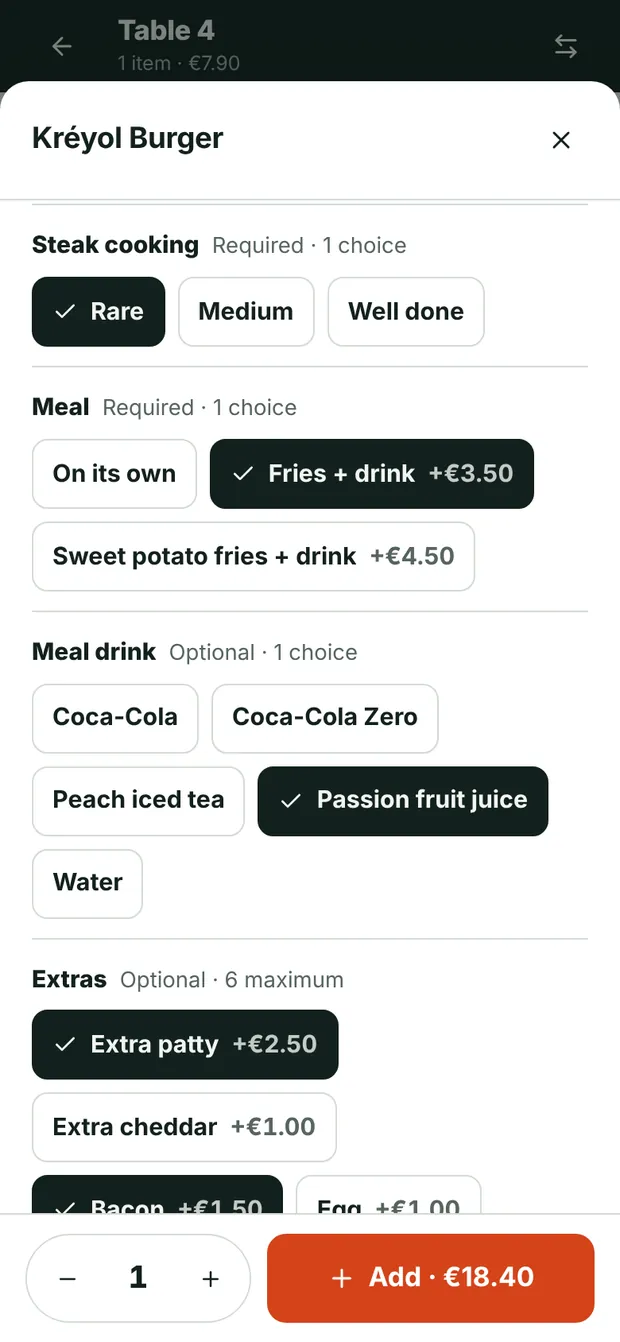
Waiter’s phone: customising a burger (cooking, extras, no onion)
No commitmentStop whenever you like
No commissionOn none of your sales
Your own devices are enoughAndroid, iPhone, tablet
Updates includedAt no extra cost
Real people to helpBy WhatsApp or phone
Live demo

Try it, right here, right now.

You are table 4’s waiter: take the order on the phone, and watch it arrive in the kitchen.

Table 4
Marie’s service
New order
Kitchen + bar0 ticketTap a line to strike it out, then “Ready”.
Waiting for an orderSend an order from the phone.
Features

From the table to the kitchen, without a single slip of paper.

Everything you need for smooth service, and nothing complicated to learn.

Order taking

Three taps, and the order is on its way.

The waiter taps the table, then the dish. The choices appear on their own: cooking, meal deal, extras, sauces, ingredients to leave out. The price adds up as they tap.

  • Paid extras added to the price automatically
  • “No onions” written in red on the kitchen ticket
  • A note for the kitchen: allergy, cooking, sauce on the side
  • Dessert can wait for the waiter’s signal
Choosing cooking, extras and ingredients to leave out on the waiter’s phone
Kitchen and bar

The kitchen gets everything, clearly, in an instant.

Every ticket arrives with a chime, in large print, with the table, the waiter and the time. Drinks go to the bar, dishes to the kitchen.

  • A timer that turns orange, then red
  • One tap to cross off a dish, another to say “ready”
  • Summary of the quantities to prepare
  • A sold-out item disappears from order taking
Kitchen screen with several tickets waiting
Dine-in

Waiters know when it’s ready, without going to check.

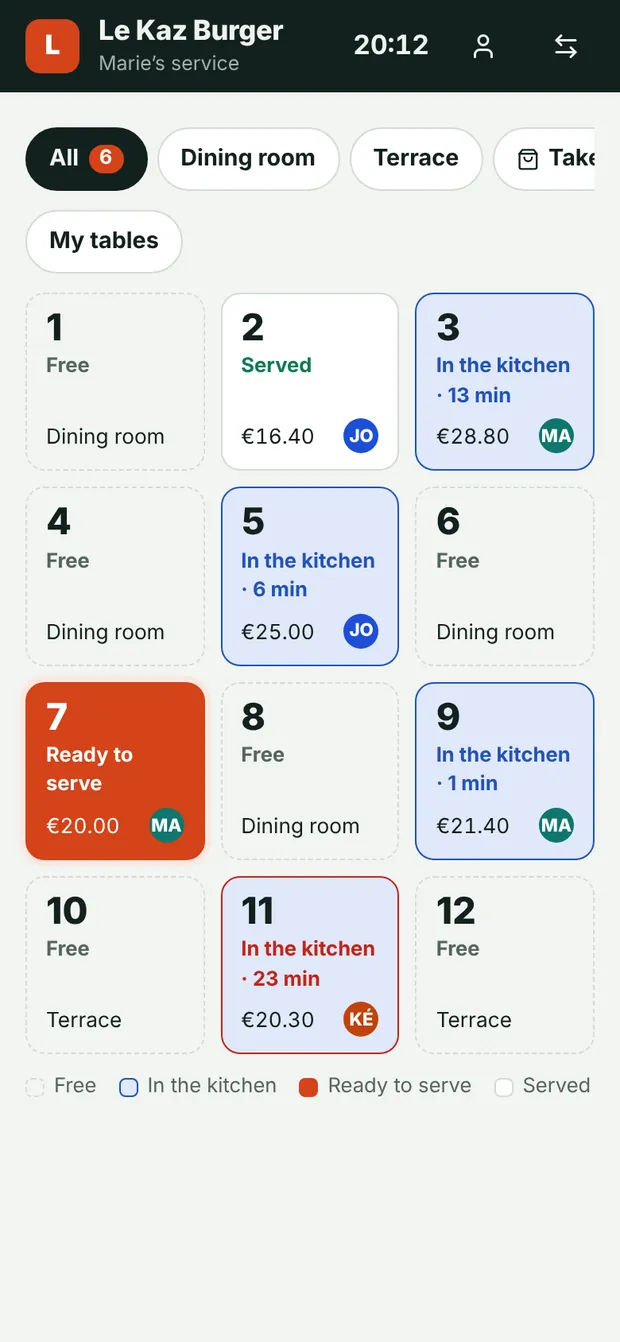
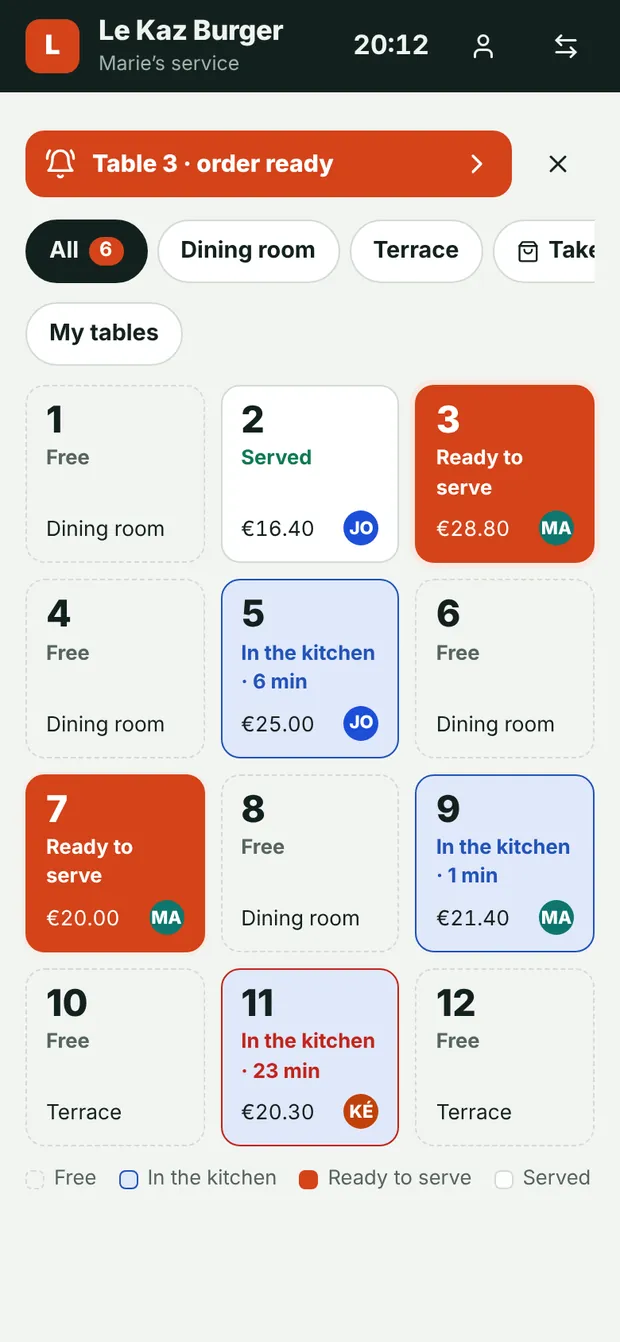
When the kitchen confirms, the waiter’s phone rings and vibrates. The floor plan shows at a glance which tables are waiting, ready or served.

  • Colour floor plan, by area
  • Table total always up to date
  • Move to another table or merge two bills
  • Takeaway orders with the customer’s name
Floor plan: tables free, in the kitchen and ready to serve
“Order ready” alert on the waiter’s phone
Manager

Menu changed? Done in a minute.

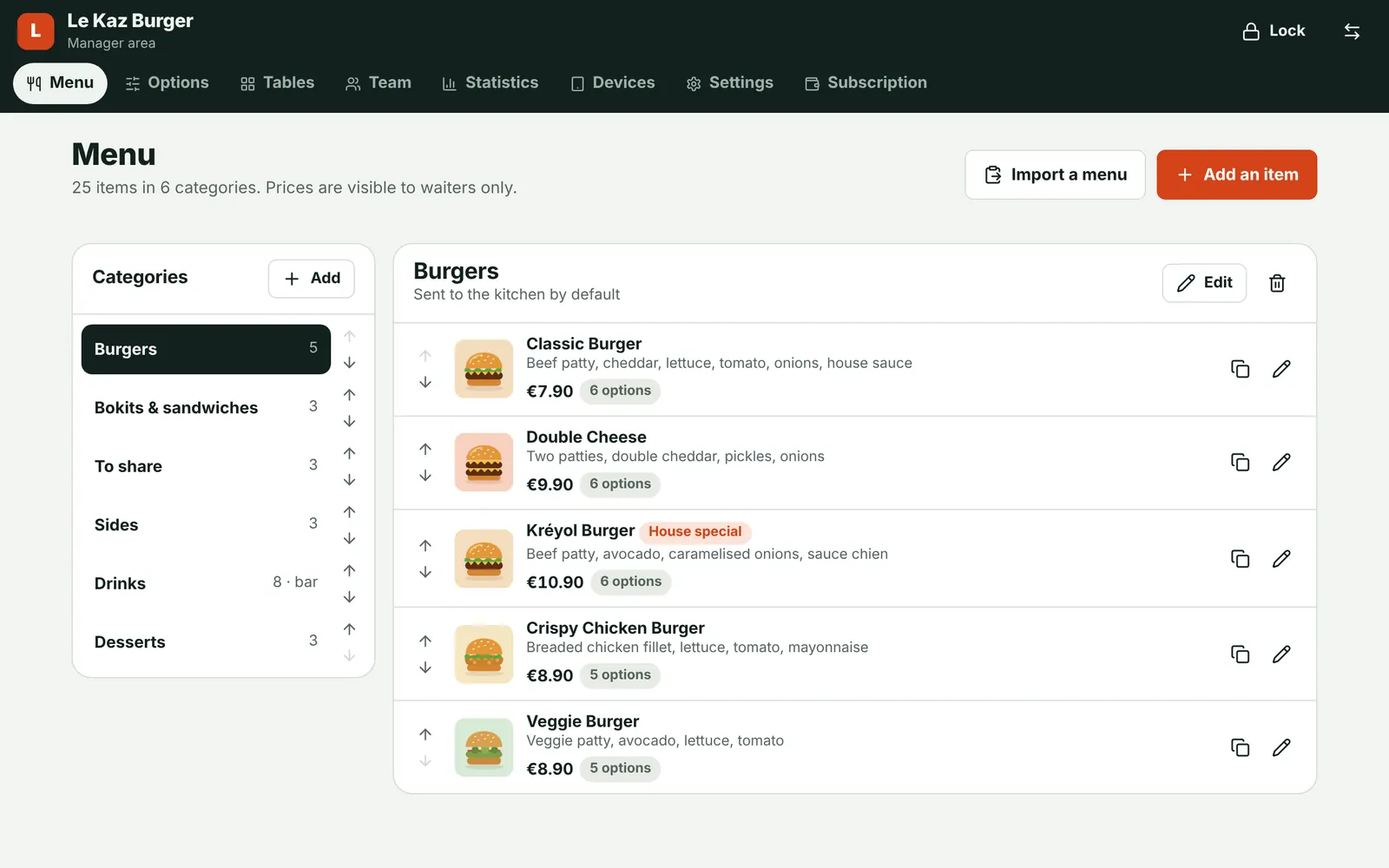
Prices, photos, descriptions, extras, dish of the day: you change everything from your phone, and it’s live on every device straight away.

  • Paste your whole menu at once, it sorts itself
  • Sales by hour, by dish and by waiter
  • Manager code: the team can’t touch prices
  • Sign out a device remotely
Manager area: the menu with photos, prices and options

And also

Takeaway

Customer name and ticket number.

Change table

Orders follow the customers.

Send later

Dessert goes out at the right time.

Sold-out items

Taken off the menu in one tap.

Waiter codes

Everyone’s name on the tickets.

Menu import

Paste your menu, it sorts itself out.

Dark kitchen screen

Readable from afar, easy on the eyes.

Everything live

All devices update on their own.

No more paper

What you will no longer have to deal with.

A handwritten slip means a possible mistake at every step: at the table, at the pass, in the kitchen, on the bill. With an order typed only once, everyone reads exactly the same thing.

Table 7 · 20:14

  • 1Unreadable order slips
  • 2Running back and forth to the pass
  • 3“I said no onions!”
  • 4The extra forgotten on the bill
  • 5The lost order pad
Who it’s for

Designed for restaurants in Guadeloupe.

Restaurants
Fast food and snack bars
Bars
Food trucks
Beach restaurants
Hotels and caterers
Pricing

Clear prices, out in the open.

No hidden quotes, no commission, no commitment. 30-day free trial on every plan.

Essential

For a snack bar, a food truck or a small dining room.

€29/ month
Or €290 per year (2 months free)
  • Up to 3 devices (for example 2 phones and the kitchen tablet)
  • Order taking and live kitchen screen
  • Unlimited menu, photos and extras
  • Takeaway
  • Statistics for the last 7 days
  • Support by WhatsApp
Try it free30 days free, no credit card
ProMost popular

For restaurants with a dining room, a terrace and a team.

€39/ month
Or €390 per year (2 months free)
  • Everything in Essential, with unlimited devices
  • Separate bar screen for drinks
  • Send in courses: starter, main, dessert
  • Full sales history and per-waiter tracking
  • Your menu set up by us
  • Team training and priority support
Try it free30 days free, no credit card
Multi-site

Several restaurants or a franchise.

On request
Depending on the number of restaurants
  • Everything in Pro, at every restaurant
  • Reduced rate from the 2nd restaurant
  • Setup and training at every site
  • A dedicated contact
Request a quote

Prices excluding tax, per restaurant.

Compare plans in detail

Included in every plan

No commitment, cancel any time
No commission on your sales
Android, iPhone, iPad and computer
Updates included
Data backed up every day
Set up in minutes with a QR code
Pay for your subscription however you likeSecure online payment. Cancel any time, at no cost.
Credit cardApple Pay and Google PaySEPA direct debitBank transfer

The Pro plan works out at €1.28 a day. Less than a coffee, for the whole service.

Getting started

Ready for the evening service.

Create your account

Two minutes, no credit card. 30-day trial.

Add your menu

Item by item, or pasted in one go. On the Pro plan, we do it for you.

Scan the QR code

On every team phone and on the kitchen tablet.

Start service

Orders reach the kitchen live.

Questions

The questions we get asked.

Do I need to buy any hardware?

No. Kòmand runs in the browser of the phones and tablets you already have, Android or iPhone. For the kitchen, a tablet at the pass is enough.

Does it replace my till?

No. Kòmand handles taking orders and sending them to the kitchen. You keep taking payments on your usual till, and each table’s total is shown to speed things up.

How long does it take to get started?

The account takes two minutes to create. Add your menu (or paste it in one go), scan the QR code on each phone, and service can start the same day.

What if the internet goes down?

Kòmand needs a connection, over Wi-Fi or 4G. If it drops, the screens show it straight away in red. A phone hotspot is enough to keep service going.

Which plan should I choose?

Essential is enough for a snack bar or a food truck: up to 3 devices, and everything arrives on the kitchen screen. Pro adds what a restaurant with a team needs: unlimited devices, a separate bar screen, sending in courses and per-waiter tracking. During the trial every feature is unlocked, and you can change plans afterwards.

Is the trial really free?

Yes. No credit card is needed for the trial. At the end, you choose a plan, or you simply stop.

Can I stop whenever I want?

Yes, with no commitment or fees. The subscription stops at the end of the month already paid.

How is the subscription paid?

By credit card, Apple Pay, Google Pay or SEPA direct debit, online and securely. Bank transfer is also possible.

Is my data protected?

Each restaurant has its own separate space, passwords are encrypted and a backup is made every day.

Contact

A question? We’ll call you back.

Leave your number: we will call you for a demo at your restaurant, with your own menu.

WhatsApp0690 90 69 48
Phone0690 90 69 48
Emailddhcompany57@gmail.com

Your details are only used to get back to you. Privacy

Your next service, without a single paper slip.

30-day free trial, no credit card. You keep your till.